Colours (/home/colors.toml)
[theme] in /etc/system_conf.toml sets the look of the whole
machine, and every app takes its defaults from there. This file is the one place to
disagree with it for a single app — with no rebuild, and without the reboot a theme change
needs.
[editor]
bg   = "midnightblue"
text = 0xFC

[shell]
bg = "black"
A missing file, a missing section and a missing key all mean "use the theme", so the file only ever holds what somebody deliberately changed. Deleting a line is how you go back.
A value is either a colour name or a number. The number is RGB332, written the same way as
in system_conf.toml.
It lives in /home because it is yours: nothing the machine ships with is written there, and
on Studio that is the directory which survives a reload and
travels in the exported archive.
From the shell
The shell changes its own two colours and writes them here for you:
color                    show the current two
color bg skyblue         the background
color text 0x1F          the text, as a number
color names              list every colour name
color reset              back to the theme
The change applies at once, with no restart.
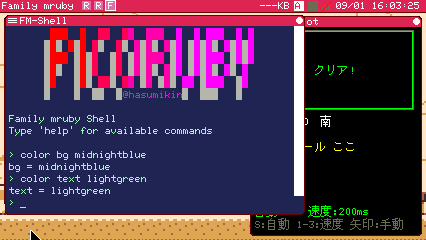
Two lines in the shell, and it keeps them across boots
From the editor
The editor has a Colors entry in its menu that walks its 31 colours, one at a time. It
writes the same file, under [editor]. The editor holds its colours in constants, so it
asks you to reopen it before the new ones are drawn.
The keys, in the order the dialog offers them:
| Group | Keys |
|---|---|
| Text area | bg, text, cursor, selection, gutter |
| Menu bar | menu_bg, menu_text, menu_key, menu_key_alt |
| Status line | status_bg, status_text, saved_bg, saved_text |
| Dropdowns | dropdown_bg, dropdown_text, dropdown_sel_bg, dropdown_sel_text |
| Dialogs | dialog_bg, dialog_text, dialog_border, dialog_key |
| Problems | problem_bg, problem_text |
| Syntax | syntax_keyword, syntax_string, syntax_comment, syntax_number, syntax_symbol, syntax_constant, syntax_variable, syntax_method |
menu_key_alt is the same role as menu_key on a light panel — yellow on white is
unreadable, so the key list uses its own.
Colour names
The names are the web's, mapped onto the 256 colours this machine can show. Collapsing them
that way means several web names land on the same colour, so the list comes in two parts:
78 names, one per distinct colour, and 23 further spellings that land on a colour already
in the list. Both are understood; color names in the shell lists the 78.
All of them, with their colours, are on Colour Names.
Related
- System Config (system_conf.toml) — the machine-wide theme
- Constants & System Info — reading the theme from an app