Architecture
Family mruby is a small multi-VM operating system on top of FreeRTOS. Several scripting VMs run side by side, one per FreeRTOS task, each with its own heap — so one app running out of memory or crashing does not take the system with it.
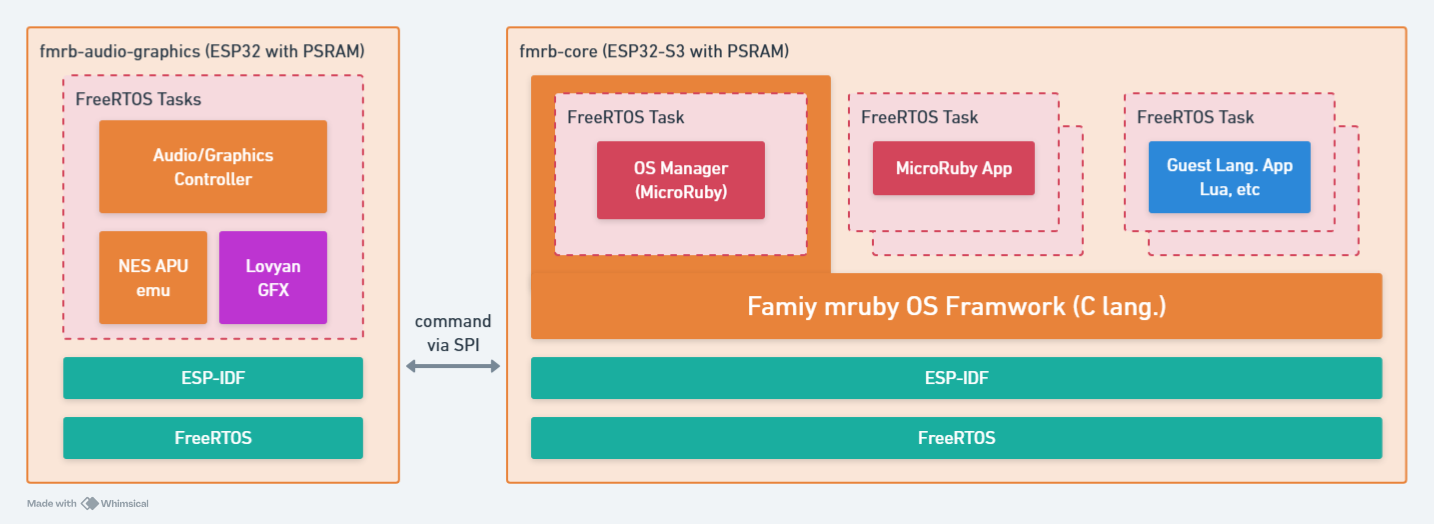
One task, one VM
The design rule is one task = one VM. Each VM has its own stack, its own memory pool and its own allocator handle. That isolation is what makes it safe to let a user's half-finished program run next to the desktop.
| User app slots | 5. How many fill depends on the memory the machine has, and max_apps can lower it |
| Heap per app | 500 KB, or 1 MB with large_memory = 1 |
| Languages | Ruby (PicoRuby), MicroPython, BASIC, Lua |
A separate pool is not just tidiness: memory fragmentation stays inside the app that caused it, and when an app dies its whole pool is reclaimed at once.
There is only one large pool, so an app that does not need it should not sit on it. The first few slots are reserved when the system starts and the rest are taken from PSRAM the first time an app lands in them — reserving all five up front would put most of a Retro machine's spare PSRAM aside whether or not anyone ever ran five apps.
Everything resident that would otherwise be an app of its own — the clock, the network watcher, the thing that reads a sentence out loud — shares a single VM instead, the service host. A dozen small jobs then cost one task and one slot rather than a dozen.
The kernel is compiled Ruby
The kernel and the desktop are written in Ruby, but they do not run on an interpreter. They are compiled ahead of time to native code — the same source, a different backend — which cut input latency substantially compared with running them on the VM. This is how the released firmware is built; the interpreted build still exists, and is what the two are checked against.
The apps you write still run on the PicoRuby VM. Only the system's own Ruby is compiled.
Two hardware shapes
The same OS runs on two very different arrangements.
Modern — one chip does everything
ESP32-P4  ── OS, VMs, graphics, sound, input, USB host
   │
   ├── MIPI-DSI panel (1280x720), PPA scaling from a 426x240 framebuffer
   ├── I2S codec, APU emulator
   ├── GT911 touch, Tab5 Keyboard (I2C), USB HID host
   └── ESP32-C6 (SDIO) ── Wi-Fi + BLE
Graphics and audio are local: the P4 composites the framebuffer itself and its PPA block scales it onto the panel. There is no second processor to talk to, which is why the same Ruby app is quicker to draw here.
Retro — the work is split across two chips
ESP32-S3 ── OS, VMs, input, USB host, Wi-Fi/BLE
   │
   │  UART, 921600 bps, CTS/RTS flow control
   ▼
ESP32-WROVER ── graphics + audio
   ├── NTSC composite out (LovyanGFX CVBS)
   └── NES APU emulator, I2S DAC
The S3 sends drawing and sound commands over a serial link; the WROVER turns them into a composite video signal and audio. Both chips have to be flashed, and both have to be on the same version, because that link is a protocol.
What the app sees
Nothing of the above. The graphics API, the audio API and the peripheral API are the same
calls on both machines — one path submits them to a local renderer, the other serialises
them onto a UART. An app that avoids hardcoding the screen size and branches on
FmrbConst::BOARD for wiring runs unchanged on either.
Hardware is owned by the system and reached through a proxy (GPIO, I2C, RMT, files), so several VMs can use the same bus without fighting over it.
Development targets
Four builds come out of the same source tree:
| Target | What it is |
|---|---|
esp32 / Modern |
ESP32-P4 (M5Stack Tab5) |
esp32 / Retro |
ESP32-S3 + ESP32-WROVER (narya-board) |
linux |
The whole system as a Linux process, with SDL2 for the screen. See Simulator |
wasm |
The same system compiled to WebAssembly, with a cooperative FreeRTOS port, running in a browser tab. See Studio |
The Linux build is not a mock: it runs the real kernel, the real desktop and the real apps, with the drivers swapped underneath. Most work can be done there before touching hardware.
Related
- Hardware — the boards in detail
- Choose your hardware
- Limitations — where the edges are