MicroPython and BASIC
Ruby is the language Family mruby is built around, but it is not the only one that runs on it. There are four: Ruby, MicroPython, BASIC and Lua.
They are not modes you switch into. A .py file and a .bas file sit in the launcher next
to the Ruby apps, start the same way, and run at the same time as each other.
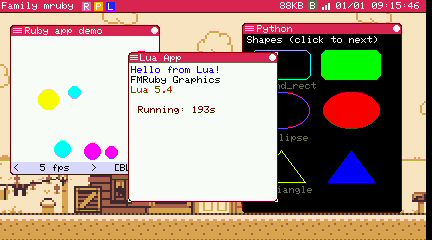
Three VMs at once — Ruby, Lua and MicroPython, each in its own window and its own heap
| Extension | Runs on | Notes |
|---|---|---|
.rb |
PicoRuby | The main language. Everything in the API Reference |
.py |
MicroPython | The same app framework as Ruby: windows, drawing, sprites, sound. One Python app at a time |
.bas |
FMRuby BASIC | Family BASIC compatible. Its own text screen and sprites |
.lua |
Lua 5.4 |
MicroPython
A .py file is an app like any other. It uses the same framework Ruby apps use — subclass
FmrbApp, override the lifecycle methods, start it:
class PythonDemoApp(FmrbApp):
    def on_create(self):
        Log.info("started on " + self.platform)
        self.draw_window_frame()

    def on_update(self):
        return 500          # ms until the next turn

    def on_event(self, ev):
        super().on_event(ev)
        if ev.get("type") == "mouse_up" and ev.get("button") == 1:
            self.next_page()

app = PythonDemoApp()
app.start()
Windows, events and drawing are reachable through the built-in _fmrb module, wrapped in
the framework classes an app subclasses. FmrbApp, FmrbGfx, FmrbAudio, SpriteImage,
SpriteInstance and Log are already in the app's namespace — there is nothing to import
for them.
The demos are /app/python/python.app.py (the twin of the PicoRuby demo, page by page) and
/app/game/breakout/breakout.app.py, a whole game: sprites for the things that move, tiles
for the things that do not, Japanese text, a tune on the main sound chip with effects on
the other. Robo Explorer has a Python pilot as well.
Where it differs from Ruby
| Ruby | Python | |
|---|---|---|
| Time | Machine.board_millis |
ticks_ms() |
| String length | String#length counts characters |
len() counts bytes |
| Another file | require "/app/..." |
import mymodule — beside the app, or /usr/lib/python |
| The framework, from that file | Visible | Not visible. Pass what it needs as arguments |
| A timer's callback | A block | A function: self.set_timer(500, self.blink) |
Splitting an app across files works, but the framework classes live in the app's namespace and not in the module's:
# in the app
import mypanel
mypanel.draw(self, state)

# in mypanel.py
def draw(app, state):
    app.gfx.draw_text(...)   # reached through the app, not named directly
One file is limited to 64 KB.
Sound
The sound chip is reached through FmrbAudio, the same shape as in Ruby. A tune goes on
the main instance and short effects on the other, so an effect does not stop the music:
audio = FmrbAudio(self)
audio.load_fmsq_file(1, "/cache/app/mygame/bgm.fmsq")   # sync_file it across first
audio.play_slot(1, FmrbAudio.MAIN)
audio.note_on(FmrbAudio.CH_PULSE2, 988, 12, 2, 0)       # an effect, on the other
Time an effect's end by ticks_ms(), not by counting frames: a heavy frame stretches the
sound.
Limitations
MicroPython's design pushes back in a few places, and these are worth knowing before you start:
One Python app at a time. MicroPython keeps its entire VM state in globals, so unlike mruby and Lua it cannot be instantiated twice. Starting a second one is refused at spawn with "Another Python app is already running." Ruby, Lua and BASIC apps are unaffected and can run alongside it.
Built-in modules only. array, builtins, collections, gc, io, math,
micropython, struct, sys and random are in. time, json, os, re, binascii,
hashlib, heapq and deflate are not — they live in MicroPython's extmod/, which this
build does not carry. For waiting, return a delay from on_update rather than sleeping.
(random is seeded from the clock, so a run differs from the last; call random.seed(n)
to repeat one.)
Files can be read, not written. open() exists but raises OSError — failing out loud
beats being silently absent. _fmrb.read_file(path) returns the whole file as bytes (up
to 64 KB) and _fmrb.file_size(path) its size. io.StringIO and the rest of the in-memory
objects work.
Strings are bytes. This build has no Unicode strings, so len("日本語") is 9 and indexing
is by byte. For a width in pixels use FmrbGfx.text_width, which walks the UTF-8.
No REPL and no threads. Creating tasks is the system's job, not a guest VM's; use a generator for concurrency inside an app.
256 KB of heap per app, fixed. Running out raises MemoryError, and an uncaught one ends
the app with a traceback in the log, exactly as running out of memory does in Ruby.
A force-stop skips on_destroy. Stopping an app that is inside a long Python loop unwinds
the bytecode, so neither destroy nor on_destroy runs. Resources are reclaimed by the C
side either way, but an app cannot rely on on_destroy to save anything — do that at a
boundary in on_update. Lua behaves the same way.
Not provided: tile map classes (draw_tile is there — lay them out yourself), image masks,
GfxBlock and the other drawing optimisations, arcs, get_pixel, extra canvases, the p5
layer, the microphone and MIDI out.
FMRuby BASIC
A BASIC interpreter built to be compatible with Family BASIC — the BASIC that shipped for the Famicom — down to its screen, its sprites and its sound statements.
This is not Ruby with a BASIC syntax on top: it is a separate interpreter written in C++,
with Family BASIC's semantics, its 28 x 24 character screen, and its PLAY / BEEP sound.
Running a BASIC program
Write it in the editor and press F5
The quickest route. Open the Editor, type the program, press F5.
- If the file has no name yet you will be asked for one. Save it under
/homeor/app— programs elsewhere will not run Ctrl+Qreturns you to the editor from a running program, even a fullscreen one. ThenF5runs it again
Put it in the launcher
Drop a .toml next to the .bas with the same name:
/app/basic/mygame.app.bas
/app/basic/mygame.app.toml
app_handle_name = "mygame"
app_screen_name = "My Game"
app_screen_name_ja = "マイゲーム"
# .bas starts fullscreen unless you ask for a window:
#default_window_mode = "window"
The launcher builds its list when the desktop starts, so right-click inside the launcher to rescan after adding a file.
A .bas without a .toml still runs from F5 or from the shell; it just uses the filename
as its name.
The screen
Family BASIC's screen is fixed at 28 characters by 24 lines (224 x 192 pixels). Started fullscreen, it is centred and the surrounding area is filled with black — the same shape the original had.
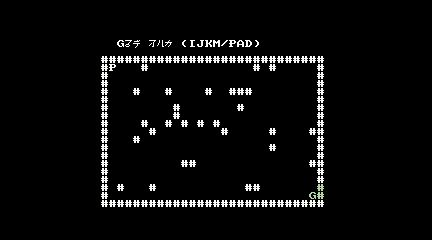
The
maze sample from /app/basic, drawn entirely out of characters
What is in it
The language core, the text screen, sprites with automatic movement, controller input,
PLAY and BEEP, character tables and palette selection, error handling and SAVE are all
implemented. Three sample programs ship in /app/basic — shoot, maze and music — beside the BASIC app
demo, which is a BASIC program launched as an ordinary app.
Compatibility
Every known difference from Family BASIC V3 is written down and classified — resolved, deliberate difference, waiting on measured data, or out of scope. Some deliberate choices worth knowing:
IF expr THEN stmtskips the:statements after it when the condition is false (the Microsoft-family behaviour)PLAYis asynchronous, so music continues while the program runsLOAD/LOAD?do nothing inside a program — on the original they were direct-mode commands.SAVEis implementedCtrl+Qstops a running program. The original had no way out of a fullscreen program
Its MML is not the MIDI MML
BASIC's PLAY uses Family BASIC's MML syntax. The MIDI layer has its own MML
for Ruby apps. They are separate implementations and the dialects differ — do not copy a
string from one to the other and expect it to play.
Which one to reach for
- Ruby for anything that needs the full API — networking, MIDI, sprites, the peripheral bus. This is the language the system is designed around
- MicroPython if Python is what you know. Expect a smaller standard library than you are used to, and one Python app at a time
- BASIC if you want the Family BASIC experience, or you are following a listing from a magazine of the era
- Lua for a small, fast script
Related
- Default Apps — the samples in each language
- App Config (.app.toml)
- API Reference — the Ruby API the other languages mirror