MIDI (MIDI::Device / FmrbMidi)
New in 2.0. Family mruby plays the part of the instrument's controller: it sends MIDI,
and something makes the sound. That something can be the machine's own APU sound chip, or an
external synth on the GROVE port — and because both sit behind the same MIDI::Device, the
same app code drives either one.
Works on both machines.
device = FmrbMidi.device(self)     # the built-in APU
device.note_on(1, 60, 100)         # channel, note number, velocity
device.note_off(1, 60)
The layer is imported from the Midori MIDI gems, so the
MIDI::Device API is the one those gems define.
Two places the sound can come out
The built-in APU
def on_create
  @device = FmrbMidi.device(self)
end

def on_update
  FmrbMidi.tick        # runs scheduled note-offs; call this every update
end
Notes are mapped onto the NES-style APU's channels. It is 4 voices — two square waves, a triangle and a noise channel — so a chord uses them up quickly, and the mapping decides which MIDI channel lands on which voice.
An external instrument, over the GROVE port
device = FmrbMidi.serial_device(tx: 53)      # plain serial MIDI out
device = FmrbMidi.sam2695_device(tx: 53)     # M5Stack Unit MIDI, reset and ready
Both return nil if the port will not open — the pins may already be taken by an I2C user —
so check before you use it:
@device = FmrbMidi.sam2695_device(tx: 53)
if @device.nil?
  Log.warn("no MIDI port")
  @device = FmrbMidi.device(self)   # fall back to the APU
end
Serial MIDI runs at 31250 baud, the MIDI standard rate. The pin depends on the board:
| Machine | GROVE pin for MIDI TX |
|---|---|
| Modern (Tab5) | GPIO 53 |
| Retro (narya-board) | GPIO 47 (GROVE 2) |
tx = FmrbConst::BOARD == "tab5" ? 53 : 47
The reference external instrument is the M5Stack Unit MIDI (SAM2695), a General MIDI module that needs only a GROVE cable — GROVE port 2 can supply its 5 V.
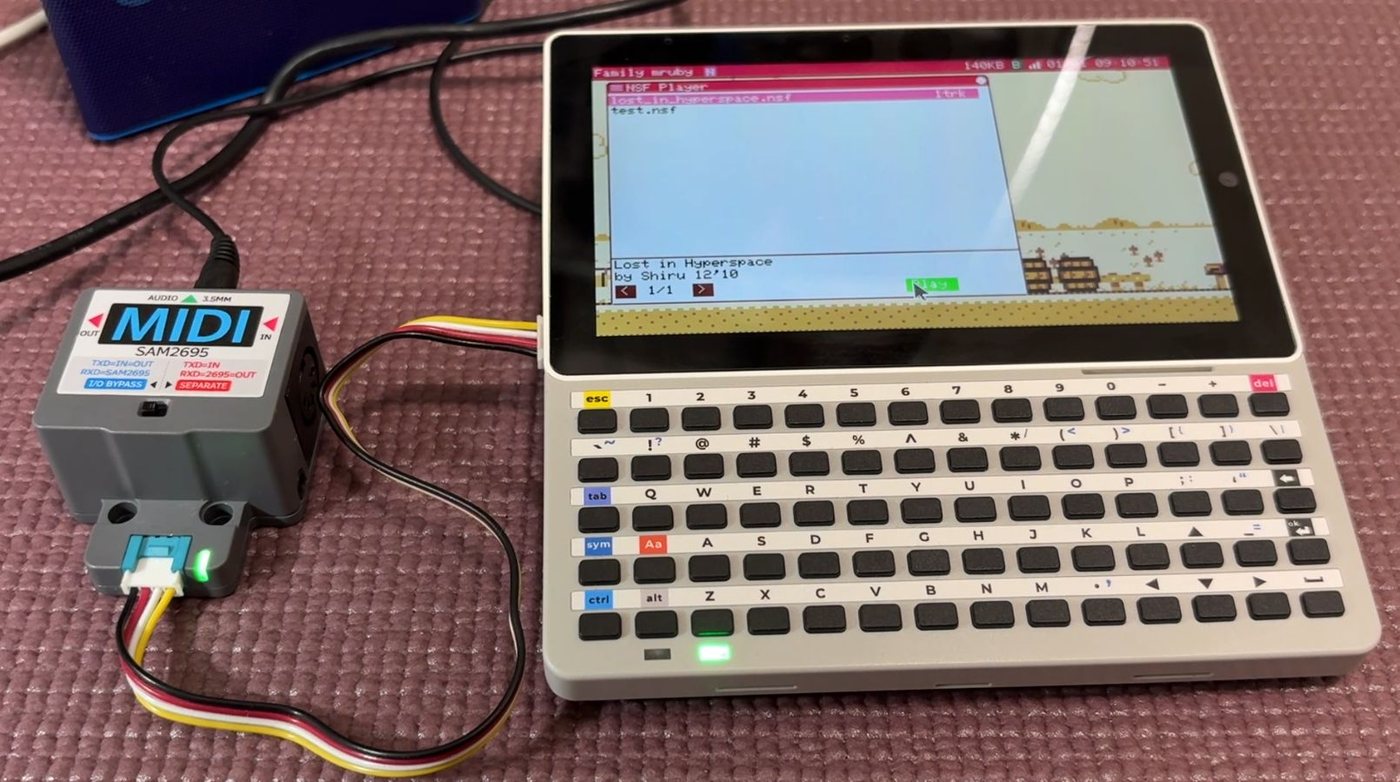
Above: the SMF player app driving a Unit MIDI over the GROVE port, with the module's own audio output going to a speaker.
Playing a standard MIDI file
player = FmrbMidi::SmfPlayer.new(@device)
player.load("/usr/share/sounds/midi/song.mid")
player.play

def on_update
  player.tick
  FmrbMidi.tick
end
player.playing? tells you when it is done, and player.stop cuts it short (silencing any
note left sounding).
Bundled songs live in /usr/share/sounds/midi. The SMF Player app
(/app/tool/smf_player.app.rb) is a full file-picking player you can read or just use.
MML
For a tune written in text rather than a file:
@device = FmrbMidi.device(self)
@player = FmrbMidi::MmlPlayer.new(@device)
@player.bpm = 120
@player.load_string("o4 l8 crdrerfrgrarbr>cr")
@player.play
Several parts play together by loading more than one string — they merge into one tune, so two voices can land on the same instant.
A tune in a file
load_file(path) reads a tune that lives beside the app's other assets instead of inside
the program that plays it. load_text(text) takes the same thing as a string. Both return
true, or false with #error saying what was wrong.
# a comment, at the start of a line only ('#' is a sharp inside a part)
bpm 120          the tempo, which the MML dialect has no command for
loop on          repeat at the end (default off)
velocity 80      applies to the parts below it (default 100)
voice triangle   which APU voice plays it: pulse1 / pulse2 / triangle / noise
duty 1           pulse width 0-3 (12.5, 25, 50, 75 per cent)
volume 100       channel volume, 0-127
program 24       instrument for an external MIDI instrument (GM)
o5 l4 cegegegc   a part. Each one goes on its own channel, in order
The four sound settings say what plays a part, which the dialect itself cannot express. They are sent to the device as the tune is loaded — the voice as a channel mapping, the rest as control and program changes — and a device with no use for one ignores it. Leave them out and the machine's own defaults stand.
The timing does not come from your update loop. The player hands the C layer commands stamped with the microsecond they are due, and a timer sends them at that microsecond without entering the VM, so the beat holds steady even when the app is busy.
The MML demo (/app/demo/mml.app.rb) plays the same tune on the APU or on an external
instrument, switchable at runtime.
This MML is not BASIC's MML
FMRuby BASIC has its own PLAY statement with Family BASIC-compatible syntax. It is a
separate implementation and the two dialects are not the same. See MicroPython and
BASIC.
Watching what goes out
For development, tools/fmrb_midi_monitor.rb in the repository prints every byte the serial
port emits, with arrival times:
note on ch1 C4 vel=100 [90 3C 64]
Because it timestamps arrivals, it measures tempo and note spacing more precisely than listening does. It can also drive a software synth on your PC so you can hear the output without any hardware.
Costs
Sending a note allocates nothing on the serial path, which is what lets a song play without the garbage collector interrupting it. Keep it that way in your own code: build the strings and arrays you need once, at load time, not inside the note loop.
Related
- FmrbAudio — the APU directly, without MIDI in the way
- Audio File Formats — FMSQ, the internal music format
- Hardware — the GROVE pins on each machine
- Default Apps — SMF Player, MIDI APU, MML