Sprites (SpriteImage / SpriteInstance / GfxBlock)
This page covers the sprite and tile map APIs.
| Class | Role |
|---|---|
SpriteImage |
Sprite image buffer (reusable pixel data) |
SpriteInstance |
A sprite instance placed on screen (position, frame, visibility) |
GfxBlock |
A mechanism that caches drawing command sequences as bytecode on the graphics side and re-sends only the variable parameters |
Call @gfx.present
After SpriteInstance#move, visible=, or frame=, you must call @gfx.present. Sprite compositing is performed at the present timing.
Sprites are composited on top of everything the canvas drew, so a windowed app starts with them confined to its user area — otherwise they would paint over its own title bar. To narrow that further, see keeping sprites inside a rectangle.
Sprite Data Structure Overview
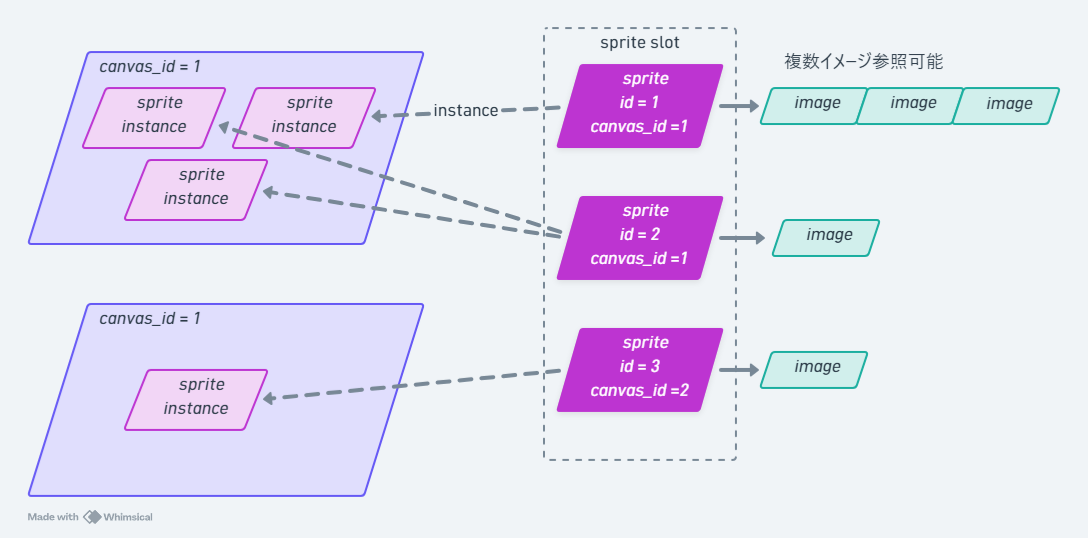
SpriteImage
A class that holds an image buffer. Referenced by SpriteInstance.
Constructor
SpriteImage.new(gfx,
                width:,
                height:,
                transparent_color: 0,
                use_transparent: false)
| Argument | Description |
|---|---|
gfx |
Parent FmrbGfx instance |
width: / height: |
In pixels |
transparent_color: |
Transparent color key (RGB332) |
use_transparent: |
When true, draws transparent_color as transparent |
Methods
| Method | Purpose |
|---|---|
set_target |
Subsequent @gfx.fill_rect etc. draw into this image |
reset_target |
Restore the drawing target to the screen canvas |
draw { |gfx| ... } |
Syntactic sugar that makes this image the drawing target only within the block |
load_bmp(path) |
Load a BMP file into the image (decoded on the graphics side, fast) |
destroy |
Release resources |
| Attribute | Description |
|---|---|
id |
Sprite image ID |
width / height |
Size |
Example
img = SpriteImage.new(@gfx, width: 32, height: 32,
                       transparent_color: 0, use_transparent: true)
img.draw do |g|
  g.fill_rect(0, 0, 32, 32, FmrbGfx::BLACK)  # Treated as transparent
  g.fill_circle(16, 16, 12, FmrbGfx::RED)
end
Loading artwork
load_bmp is decoded on the graphics side, which reads its own filesystem — so the file has
to be put there first. sync_file does that, and skips the copy when the bytes already
match, so it is cheap to call on every start:
SRC   = "/usr/share/sprites/flappy"
CACHE = "/cache/app/flappy"

img = SpriteImage.new(@gfx, width: 16, height: 16,
                      transparent_color: 0, use_transparent: true)
@gfx.sync_file("#{SRC}/bird_body.bmp", dest: "#{CACHE}/bird_body.bmp")
img.load_bmp("#{CACHE}/bird_body.bmp")
The bundled artwork lives under /usr/share/sprites/<app>/, and an app with its own bundle
directory (like rpg_demo) keeps it beside its code. Either way the copy goes under
/cache, which the system rebuilds on its own.
The file is an RGB332 BMP — its bytes are colour values, not palette indices. A PNG is a
different door: FmrbGfx#create_image. See
Image & Icon Files.
How many there can be
Images and instances are the machine's, not the app's: every app draws from the same pool.
| Modern | Retro | |
|---|---|---|
SpriteImage |
160 | 64 |
SpriteInstance |
320 | 128 |
An instance takes up to 8 frames.
SpriteInstance
Manages the on-screen position and animation of a sprite.
Constructor
SpriteInstance.new(gfx,
                   images,    # SpriteImage or Array
                   x:, y:,
                   z: 0)
Passing multiple SpriteImage objects in images creates animation frames.
Methods
| Method | Purpose |
|---|---|
move(x, y) |
Change position |
visible = bool |
Show / hide |
frame = index |
Animation frame number |
destroy |
Release resources |
Example: Animated Sprite
class SpriteApp < FmrbApp
  def on_create
    frames = []
    3.times do |i|
      img = SpriteImage.new(@gfx, width: 16, height: 16,
                              transparent_color: 0, use_transparent: true)
      img.draw do |g|
        g.fill_rect(0, 0, 16, 16, FmrbGfx::BLACK)
        g.fill_circle(8, 8, 4 + i * 2, FmrbGfx::YELLOW)
      end
      frames << img
    end
    @sprite = SpriteInstance.new(@gfx, frames,
                                  x: @user_area_x0 + 50,
                                  y: @user_area_y0 + 30, z: 1)
    @frame = 0
  end

  def on_update
    @frame = (@frame + 1) % 3
    @sprite.frame = @frame
    @gfx.present  # Important
    150
  end
end

SpriteApp.new.start
GfxBlock
Block bytecode for speeding up repeatedly redrawn UI elements (window frames, scrollbar thumbs, HUDs, etc.).
How it works:
- The given block is evaluated twice to detect integer arguments that change, which become "registers"
- The drawing command sequence is compiled and cached on the graphics side
- On
draw(kwargs)calls, only the changed register values are sent for re-execution
This is far more bandwidth-efficient than sending dozens of drawing commands every frame (FmrbApp itself uses this for drawing window frames).
Constraints
| Constraint | Details |
|---|---|
| The block must produce the same instruction sequence | Varying the number of instructions with if is not allowed. A fixed number of iterations within a loop is OK |
| String arguments are fixed | The text string for draw_text is fixed at new time |
| Only Integer / Float can be kwargs | Boolean is not allowed |
| Maximum 16 registers | Total number of variable parameters |
| Payload limit | 220 bytes after compilation (UART single-frame limit) |
Available Drawing DSL
| Method | Signature |
|---|---|
clear(color) |
-- |
draw_rect / fill_rect |
(x, y, w, h, color) |
draw_round_rect / fill_round_rect |
(x, y, w, h, r, color) |
draw_line |
(x0, y0, x1, y1, color) |
fill_circle |
(x, y, r, color) |
draw_text |
(x, y, str, color) (str is a fixed string) |
Example: Battery Gauge
class BatteryGauge < FmrbApp
  def on_create
    x = @user_area_x0 + 5
    y = @user_area_y0 + 5
    @gauge = GfxBlock.new(@gfx, fill: 50) do |r, fill:|
      r.draw_rect(x, y, 60, 12, FmrbGfx::WHITE)
      r.fill_rect(x + 1, y + 1, fill, 10, FmrbGfx::GREEN)
    end
    @level = 50
  end

  def on_update
    @level = (@level + 5) % 60
    @gauge.draw(fill: @level)
    @gfx.present
    300
  end

  def on_destroy
    @gauge.destroy if @gauge
  end
end

BatteryGauge.new.start
Exceptions
| Exception | Trigger |
|---|---|
GfxBlock::StructureError |
The instruction sequence differs between the first and second evaluations |
GfxBlock::TooManyRegsError |
The number of variable parameters is 17 or more |
GfxBlock::UnsupportedKwargError |
A kwarg of a type other than Integer / Float / String was passed |
GfxBlock::PayloadTooLargeError |
The compiled payload exceeds 220 bytes |
When to use GfxBlock
- You draw shapes with the same structure every frame (HUDs, bars, frames, etc.)
- Only coordinates or colors change, while the instruction sequence stays fixed
- You want to send many drawing commands in a single
present
For UI with changing shapes or many conditional branches, use regular FmrbGfx methods instead.